


When Meta ships an update to WhatsApp Business, we pay attention. And especially if you're scaling on the WhatsApp Business API, you need to keep your eyes peeled.
Coexistence or Embedded Signup flow as Meta calls, lets you connect a WhatsApp Business API account to a number that's already running on the WhatsApp Business app, without losing your existing conversations.
It's been live for a while now, and Meta keeps expanding what it covers, so here's where things actually stand.
Note: WhatsApp Coexistence is also widely referred to as WhatsApp Companion mode by some users. But we’ll refer to the feature as Coexistence, since it’s the official Meta-coined term.
What is WhatsApp Coexistence?
WhatsApp Coexistence helps you turn on the WhatsApp Business API for a number that's still active on the WhatsApp Business app, and keep both running.
Before this existed, the Business app and the cloud API were two separate entities. Moving from one to the other meant starting over with a fresh number or account, no transferred context, and no conversation history.
It works a bit like logging into Instagram with your Facebook account. Same parent company, same underlying account, and the two surfaces just recognize each other.
There’s something worth flagging upfront: WhatsApp Coexistence isn't switched on by default. Our support team has to activate it for your workspace first. So, this isn't a setting you'll stumble on while poking around.
WhatsApp Coexistence is a bridge between personal and professional business messaging
The old headache was that you either ran one-to-one conversations through the app, or you scaled up through the API. Never both. It was like having two phone numbers for the same business, plus the hassle of setting each one up separately.
Meta's Embedded Signup flow closes that gap. You can handle personal, one-to-one replies through the app and scale messaging operations through WhatsApp Business API, on the same number, with message history staying in sync between both.
What this actually looks like for a business
Say you run a travel company. You've used the WhatsApp Business app for a few years to answer inquiries, send trip itineraries, and handle customization requests. It works, but it's starting to strain your time for repetitive enquiries as you grow.
Before Coexistence, moving to an API platform meant starting fresh. New system, no chat history, a learning curve for the whole team, and two disconnected systems to juggle in the meantime.
Now, onboarding onto a WhatsApp Business API like Gallabox keeps your data intact. You still handle your VIP customers personally from the app, while automation covers the repetitive stuff through the platform. Everything stays in sync.
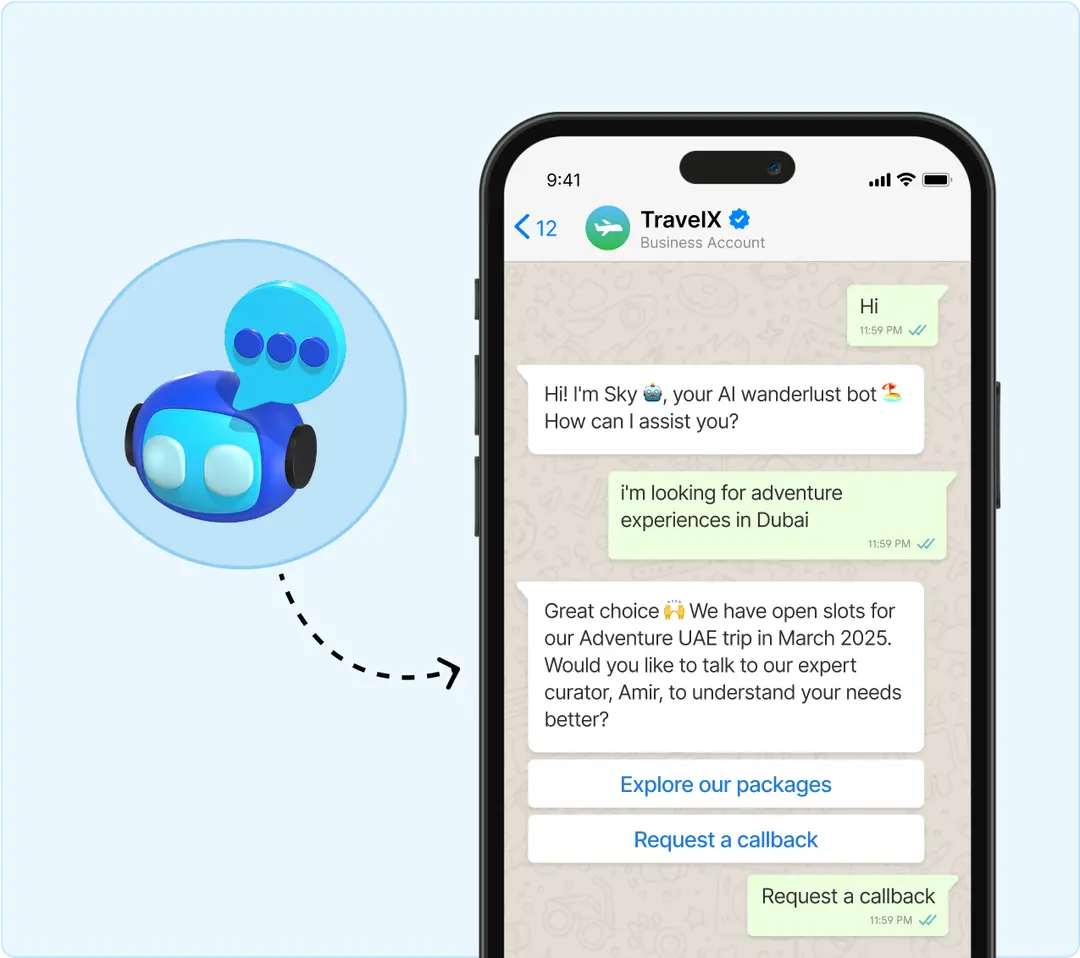
Before
After
App and API
Two completely separate systems
Bridged, same number, both running
Conversation history
Lost when moving to the API Lost
when moving to the API
Synced across both
Business operations
Personal (app) or scaled (API),
pick one
10+ Both, at once
Customer experience
Feels like two different businesses
One coherent experience
Onboarding
Start over, double the learning curve
Existing context carries over
FEATURES
30+ Native integrations
From CRMs to eCommerce platforms, Gallabox connects with 30+ business apps out of the box. Learn more.
Gallabox
Aisensy
Intelligent workflow automation
From CRMs to eCommerce platforms, Gallabox connects with 30+ business apps out of the box. Learn more.
Gallabox
30+ integrations
Aisensy
10+ integrations
Actionable campaign insights
Measure performance with message tracking, template-level analytics, and campaign outcomes. Learn more.
Gallabox
Aisensy
Enterprise-grade safeguards
Protect business-critical conversations with IP controls and number masking. Learn more.
Gallabox
Aisensy
At a feature level, this is what changes. At a use-case level, here's where it actually pays off:

All without losing the one-to-one relationships you've already built.
How Coexistence actually works
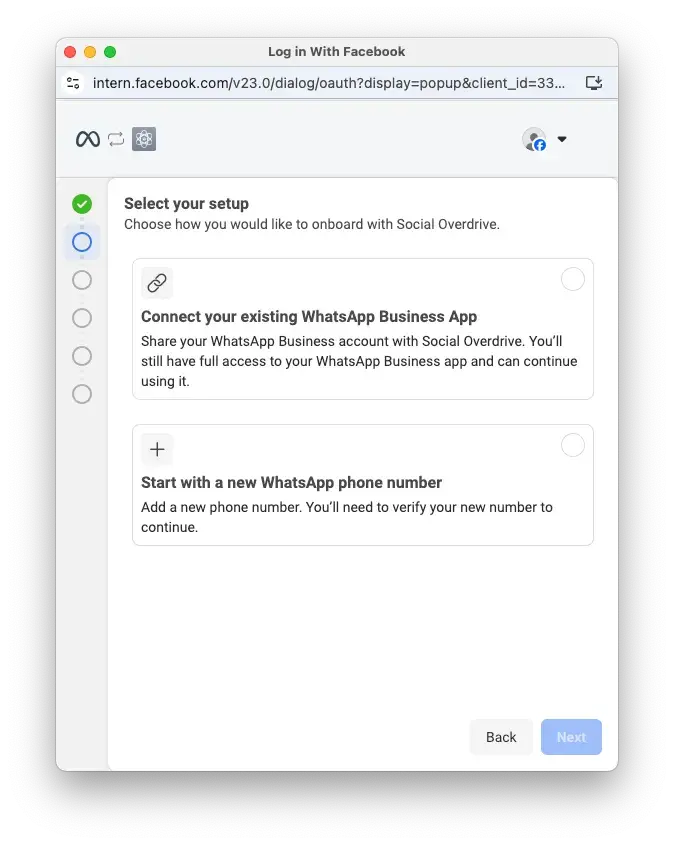
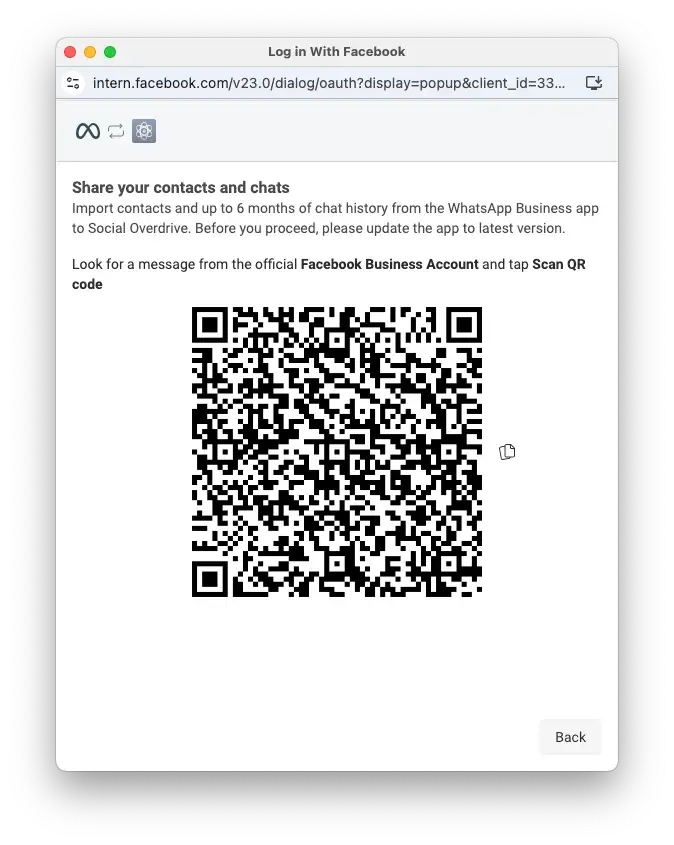
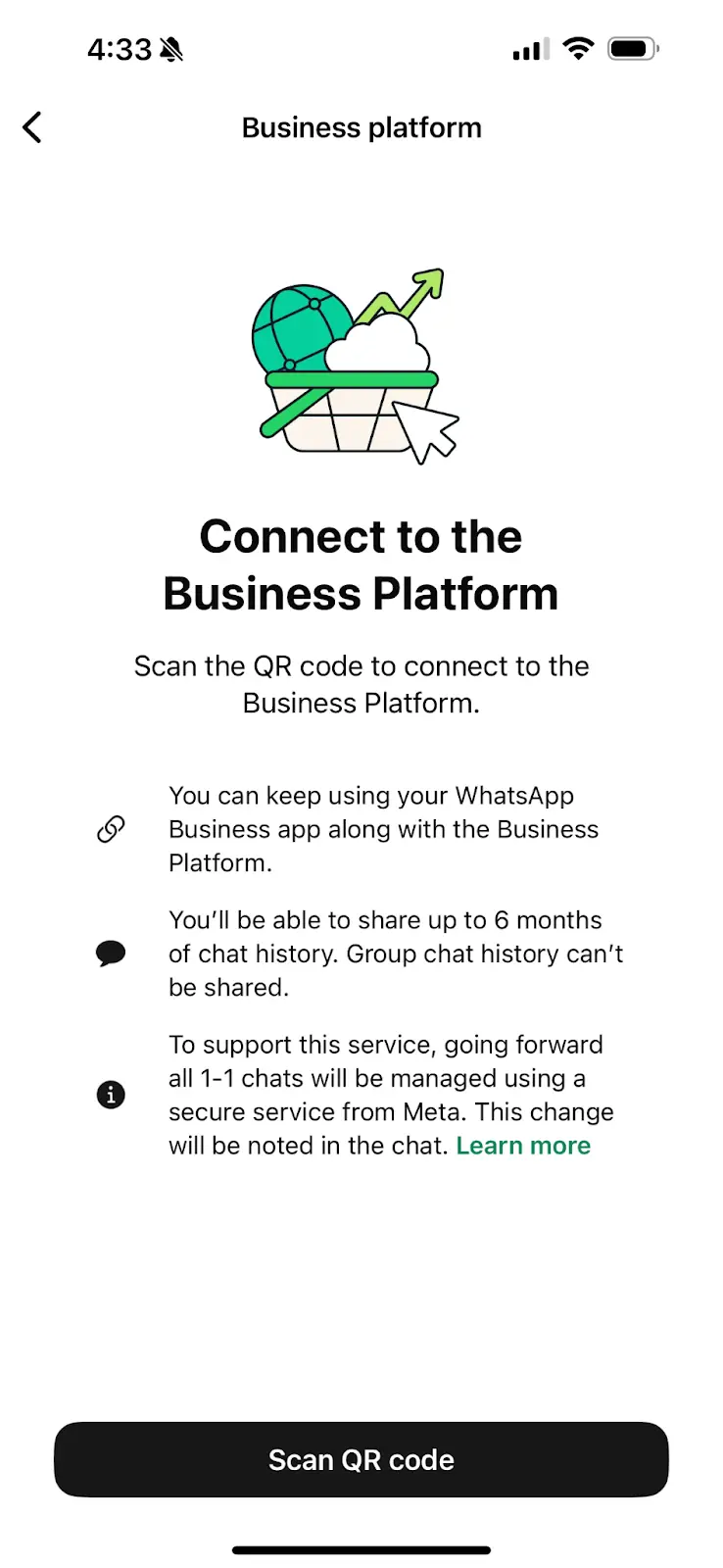
From here, you get both. The app for personal replies, the API for scale and automation.
Is Coexistence actually right for your business?
It's built for a specific kind of business, not every business.
Coexistence makes sense if you're already living in the WhatsApp Business app but need your team to have access too. r if you want automation running without disrupting conversations that are already live.
So, it's a natural fit for SMEs and growing brands who want to test the cloud API before going all in.
But there are a few patterns we see a lot from onboarding customers into Gallabox with Coexistence:
Founder-led or personal sales: The founder or a still closes high-touch deals from their phone, while the team runs follow-ups and campaigns through Gallabox. This can also involve sales folks with deeper relationships with some prospects or customers.
Support and success teams scaling up: Support moves into API with SLAs and assignment rules, but agents can still reply from their phone when they need to. There could also be account managers who will still need to maintain a personal connection with their contacts or a segment of customers.
If none of that sounds like you, and you're building a large, centralized operation with complex routing and AI agents, a full API migration is probably the cleaner move. Coexistence is for teams that still need a phone and the WhatsApp Business app in someone's hand.
What changes once you turn ON Coexistence
Coexistence comes with rules set by Meta, not WhatsApp Business API platforms like Gallabox. So, here's what actually shifts:
FEATURES
WhatsApp Business app
WhatsApp Business API
1:1 chats
Continues as usual, but edit and revoke
stop working
Supported, with 6 months of synced
history and mirrored future messages
Disappearing messages, view once, live location
Turned off for all 1:1 chats
Not supported
Broadcast lists
Existing lists become read-only,
no new ones
APIs like Gallabox offer better
broadcast options with
AI replies, deep analytics,
drip sequences, and more
Group chats
No change
Not applicable
Voice and video calls
No change
WhatsApp voice calls available on Gallabox (both human and AI agents)
FEATURES
30+ Native integrations
From CRMs to eCommerce platforms, Gallabox connects with 30+ business apps out of the box. Learn more.
Gallabox
Aisensy
Intelligent workflow automation
From CRMs to eCommerce platforms, Gallabox connects with 30+ business apps out of the box. Learn more.
Gallabox
30+ integrations
Aisensy
10+ integrations
Actionable campaign insights
Measure performance with message tracking, template-level analytics, and campaign outcomes. Learn more.
Gallabox
Aisensy
Enterprise-grade safeguards
Protect business-critical conversations with IP controls and number masking. Learn more.
Gallabox
Aisensy
One more important info to note: Connecting will automatically unlink any companion devices (WhatsApp Web, tablets). You can relink them once setup is done.
Some fine print about WhatsApp Coexistence
Coexistence needs WhatsApp Business app version 2.24.17 or higher, and a phone number from a supported country.
The list of unsupported countries has shrunk a lot since launch. At this point, it's down to Nigeria and South Africa. Meta's still rolling out coverage in phases, so if your number gets flagged as ineligible, it's worth checking again in a few weeks rather than assuming it's permanent.
A few other numbers worth knowing:
How to keep the Coexistence connection intact
Once Coexistence is running, it needs to stay active, or Meta will quietly remove WhatsApp Business API from your account, and you'll have to re-onboard.
This usually happens for one of a few reasons:
The fix is straightforward, even if a little annoying. Keep the app active, avoid switching devices without a heads-up to support, and stay on top of Meta's policies. If you do get disconnected, re-onboarding follows the same steps as the first time, except the chat history sharing option won't be available again. That one only comes around once.
A few downsides about Coexistence that the docs don't spell out
Coexistence works as advertised. Well, mostly. But talk to people who've actually run it, and a handful of real-world quirks can come up often enough. The first week or two after switching can be a bit messy.
But none of this makes Coexistence a bad option.
At Gallabox, we onboarded a real estate giant recently for over 100 seats with WhatsApp Coexistence. The snags didn’t last for more than 2-3 days and nothing we couldn’t handle. So, there’s absolutely no fear mongering needed about data loss or operational problems
How Gallabox fits into your Coexistence switch
Gallabox's AI agents, bots, and shared inbox are built to work with this onboarding flow. Your team keeps the personal touch that made WhatsApp valuable to your business in the first place, while handling a lot more volume than a few phones could manage.
This matters most if you're running your entire sales cycle and customer journey on WhatsApp. Going from leads to deals needs historical context, and Coexistence ensures you don't have to give that up for AI and automation. When a customer's history syncs between the app and the cloud API, that context is right there for your team, instead of being buried somewhere they can't fetch it from.
Try Gallabox for free and see what Coexistence looks like on your own number.
FAQs about WhatsApp Coexistence


