



After patients leave your clinic, this workflow automatically sends care instructions, medication schedules, and follow-up reminders via WhatsApp. Instead of handing out paper instructions that get lost or forgotten, patients receive clear, timely messages about when to take medicines, which symptoms to monitor, and when to return for follow-up. It improves treatment adherence, supports better recovery outcomes, and reduces unnecessary repeat visits due to confusion.
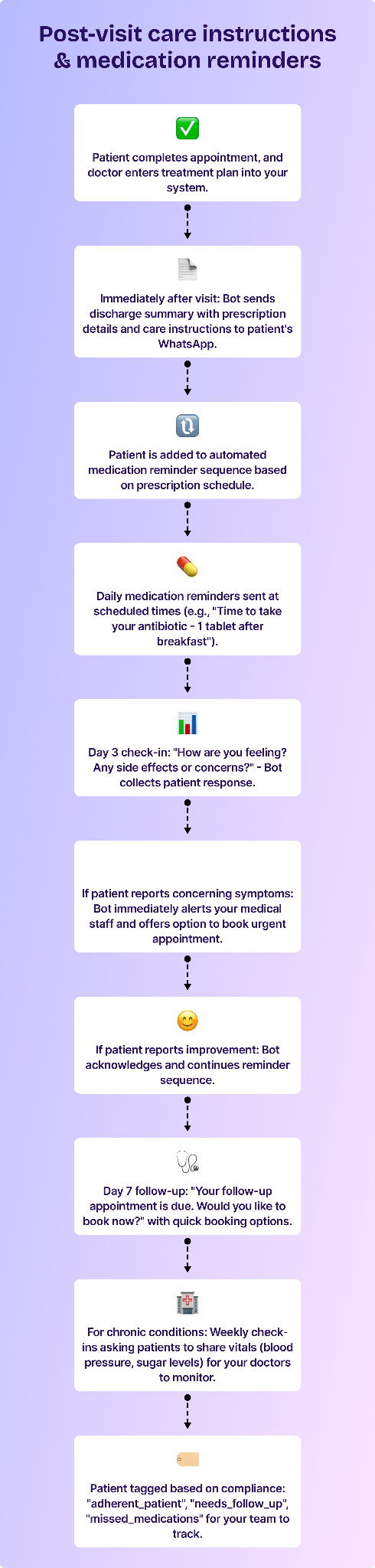
Here's how you can set up the post-visit care sequence:
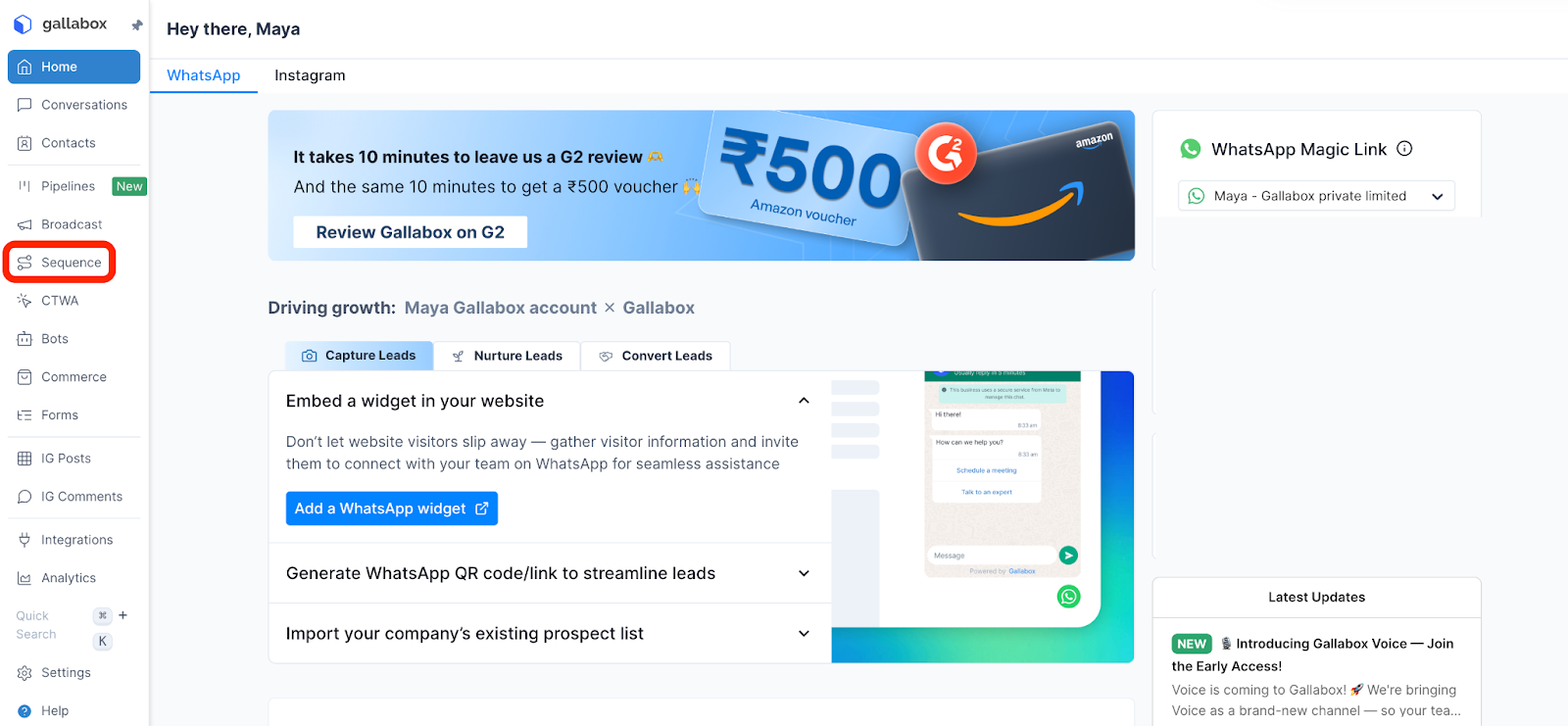
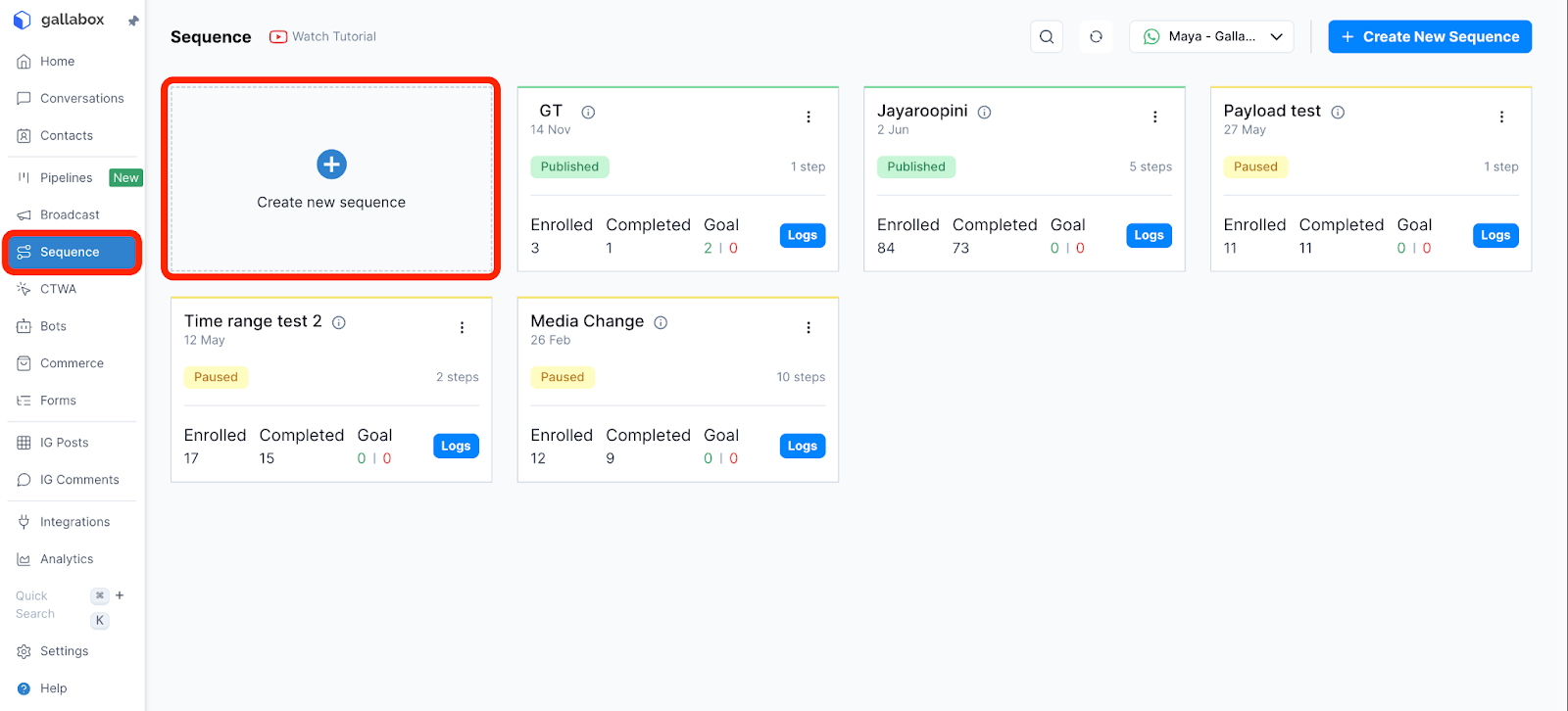
- In the Gallabox dashboard, select Sequences.
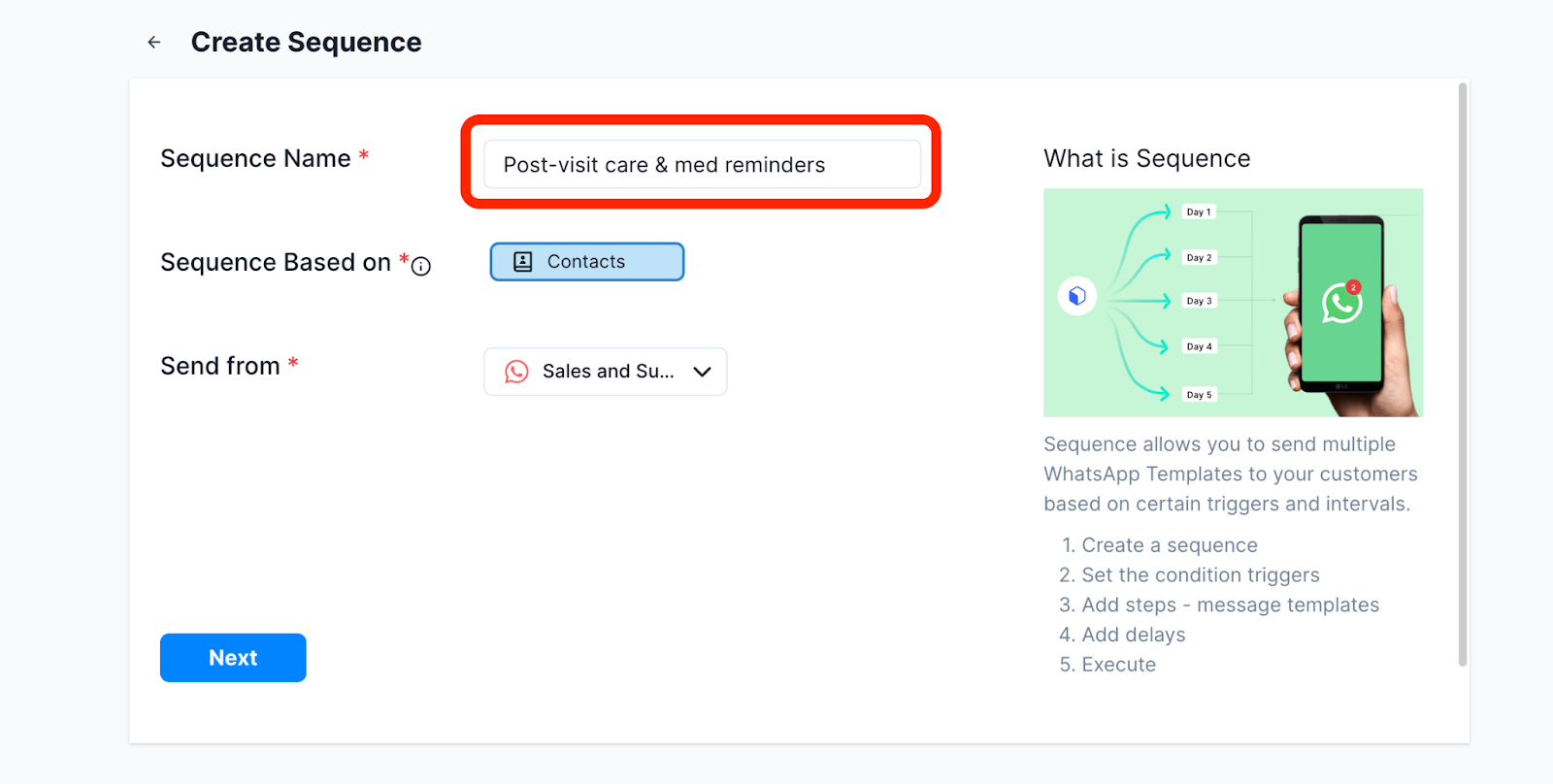
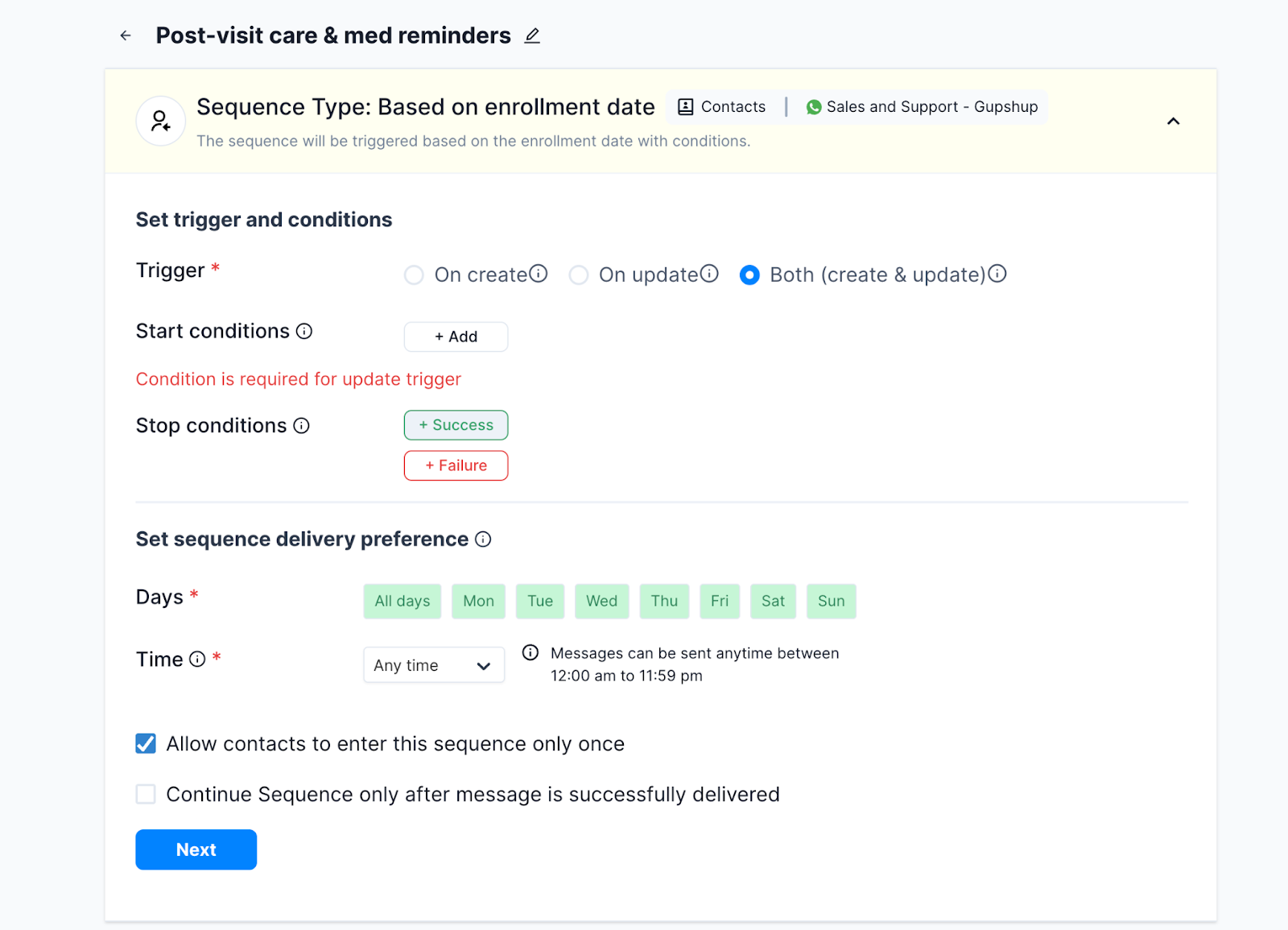
- Create a new sequence and name it "Post-Visit Care & Medication Reminders".
- Set the trigger conditions:
- Target audience: Patients tagged as "visit_completed"
- Channel: WhatsApp
- Start condition: Immediately after doctor marks appointment as complete in your system
- Set up the immediate post-visit message (sent right after appointment):
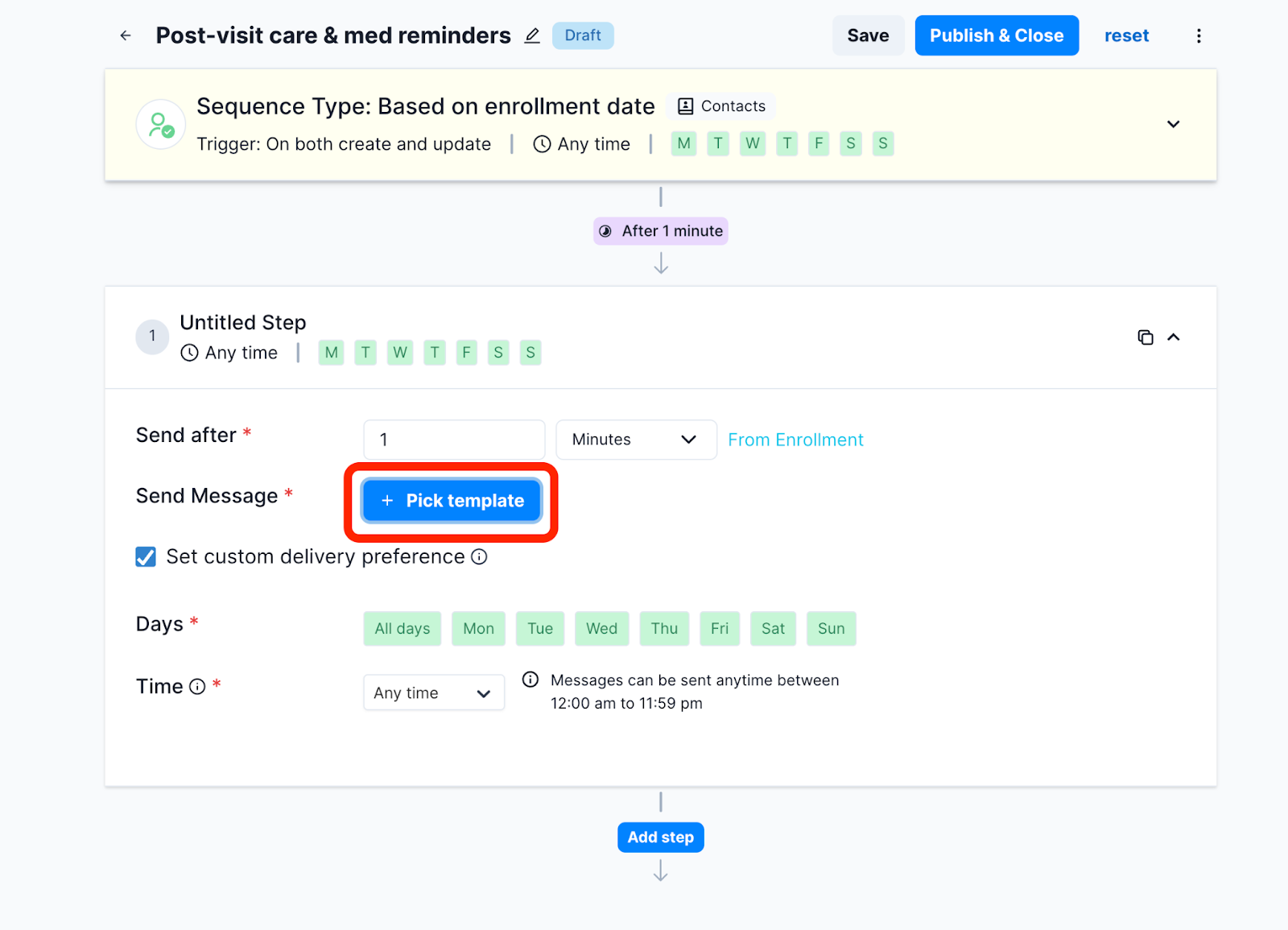
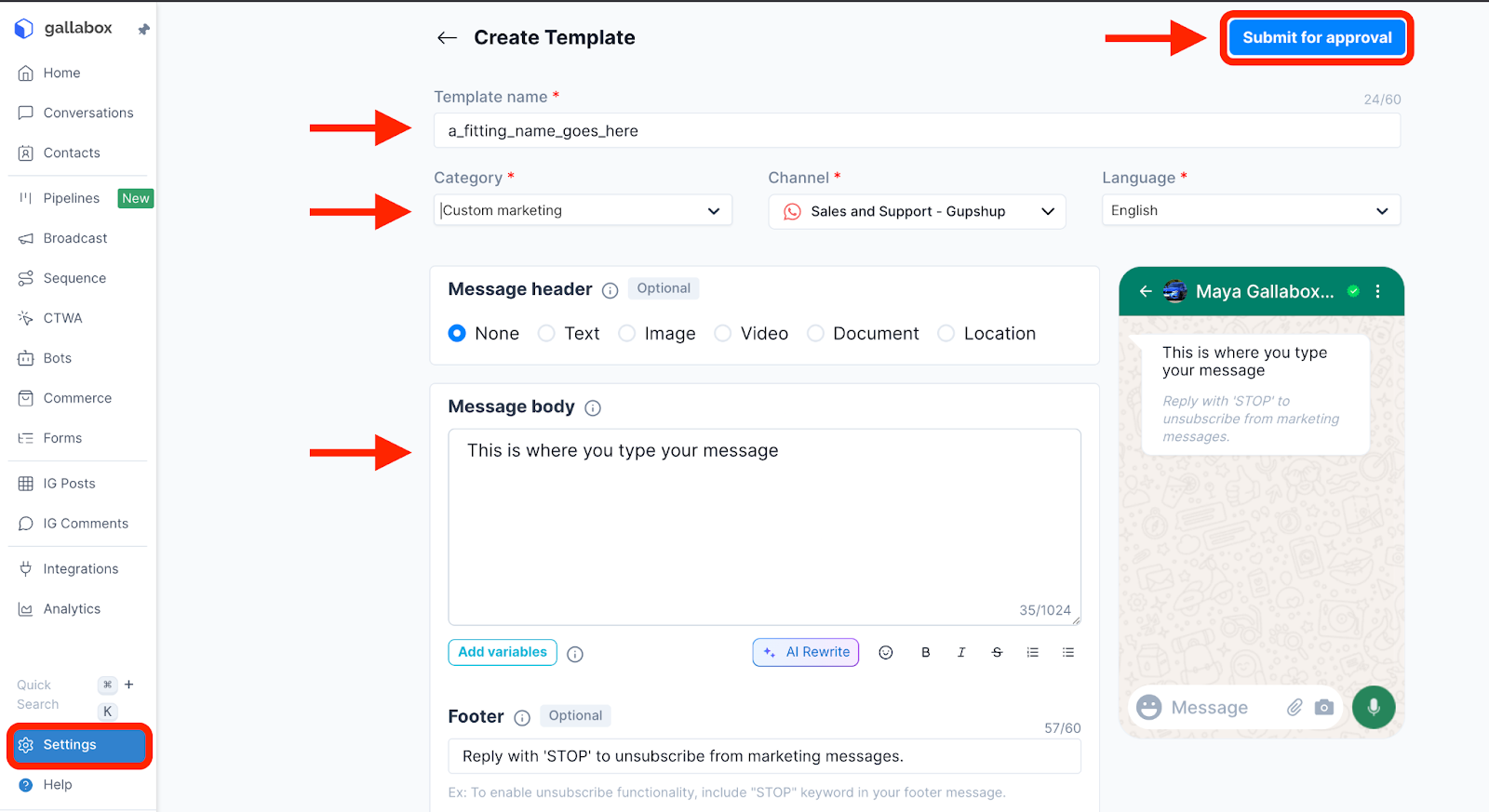
- Create a template message for WhatsApp approval with variables:
- "Hi [Patient Name], thank you for visiting [Clinic Name] today. Here's your care summary:"
- "Diagnosis: [Diagnosis]"
- "Prescribed medications: [Medication list with dosage]"
- "Care instructions: [Doctor's instructions]"
- "Warning signs to watch: [Red flags]"
- "Follow-up needed: [Yes/No and timeline]"
- "Questions? Reply anytime or call us at [Phone]"
- Create a template message for WhatsApp approval with variables:
- Set up medication reminder messages:
- Create multiple sequences based on medication schedules:
- For daily medications: Daily reminders at specific times
- Morning (8 AM): "Good morning! Time for your [Medicine name] - [Dosage] - Take with/after food"
- Afternoon (2 PM): "[Medicine name] reminder - [Dosage]"
- Night (9 PM): "Don't forget your evening [Medicine name] - [Dosage]"
- For daily medications: Daily reminders at specific times
- For medications taken multiple times: Set reminders at exact prescribed intervals
- Include quick reply buttons: "✅ Taken" or "⏰ Remind me in 30 mins"
- Create multiple sequences based on medication schedules:
- Set up check-in messages at specific intervals:
- Day 3 check-in:
- Message: "Hi [Name], how are you feeling after 3 days of treatment? Reply with:
- 😊 Much better
- 😐 About the same
- 😟 Worse or new symptoms"
- If patient replies "Worse or new symptoms": Auto-assign to doctor with patient details and tag as "needs_urgent_review"
- Message: "Hi [Name], how are you feeling after 3 days of treatment? Reply with:
- Day 7 follow-up reminder:
- Message: "Hi [Name], your follow-up appointment is recommended. Would you like to book now?"
- Quick reply buttons: "📅 Book appointment" or "📞 Call me"
- If "Book appointment" clicked: Connect to appointment booking bot
- Day 3 check-in:
- Submit all message templates to WhatsApp for approval before publishing.
- Publish the sequence to make it active.
.svg)

.png)
Get your business on WhatsApp with Gallabox
Heading

After patients leave your clinic, this workflow automatically sends care instructions, medication schedules, and follow-up reminders via WhatsApp. Instead of handing out paper instructions that get lost or forgotten, patients receive clear, timely messages about when to take medicines, which symptoms to monitor, and when to return for follow-up. It improves treatment adherence, supports better recovery outcomes, and reduces unnecessary repeat visits due to confusion.
Here's how you can set up the post-visit care sequence:
- In the Gallabox dashboard, select Sequences.
- Create a new sequence and name it "Post-Visit Care & Medication Reminders".
- Set the trigger conditions:
- Target audience: Patients tagged as "visit_completed"
- Channel: WhatsApp
- Start condition: Immediately after doctor marks appointment as complete in your system
- Set up the immediate post-visit message (sent right after appointment):
- Create a template message for WhatsApp approval with variables:
- "Hi [Patient Name], thank you for visiting [Clinic Name] today. Here's your care summary:"
- "Diagnosis: [Diagnosis]"
- "Prescribed medications: [Medication list with dosage]"
- "Care instructions: [Doctor's instructions]"
- "Warning signs to watch: [Red flags]"
- "Follow-up needed: [Yes/No and timeline]"
- "Questions? Reply anytime or call us at [Phone]"
- Create a template message for WhatsApp approval with variables:
- Set up medication reminder messages:
- Create multiple sequences based on medication schedules:
- For daily medications: Daily reminders at specific times
- Morning (8 AM): "Good morning! Time for your [Medicine name] - [Dosage] - Take with/after food"
- Afternoon (2 PM): "[Medicine name] reminder - [Dosage]"
- Night (9 PM): "Don't forget your evening [Medicine name] - [Dosage]"
- For daily medications: Daily reminders at specific times
- For medications taken multiple times: Set reminders at exact prescribed intervals
- Include quick reply buttons: "✅ Taken" or "⏰ Remind me in 30 mins"
- Create multiple sequences based on medication schedules:
- Set up check-in messages at specific intervals:
- Day 3 check-in:
- Message: "Hi [Name], how are you feeling after 3 days of treatment? Reply with:
- 😊 Much better
- 😐 About the same
- 😟 Worse or new symptoms"
- If patient replies "Worse or new symptoms": Auto-assign to doctor with patient details and tag as "needs_urgent_review"
- Message: "Hi [Name], how are you feeling after 3 days of treatment? Reply with:
- Day 7 follow-up reminder:
- Message: "Hi [Name], your follow-up appointment is recommended. Would you like to book now?"
- Quick reply buttons: "📅 Book appointment" or "📞 Call me"
- If "Book appointment" clicked: Connect to appointment booking bot
- Day 3 check-in:
- Submit all message templates to WhatsApp for approval before publishing.
- Publish the sequence to make it active.
Get your business on WhatsApp with Gallabox
Get your business on WhatsApp with Gallabox
Related articles
Take Gallabox for a 7-day ride
.svg)


%201.webp)


