


.png)

For almost two years, replying to a customer on WhatsApp cost you nothing.
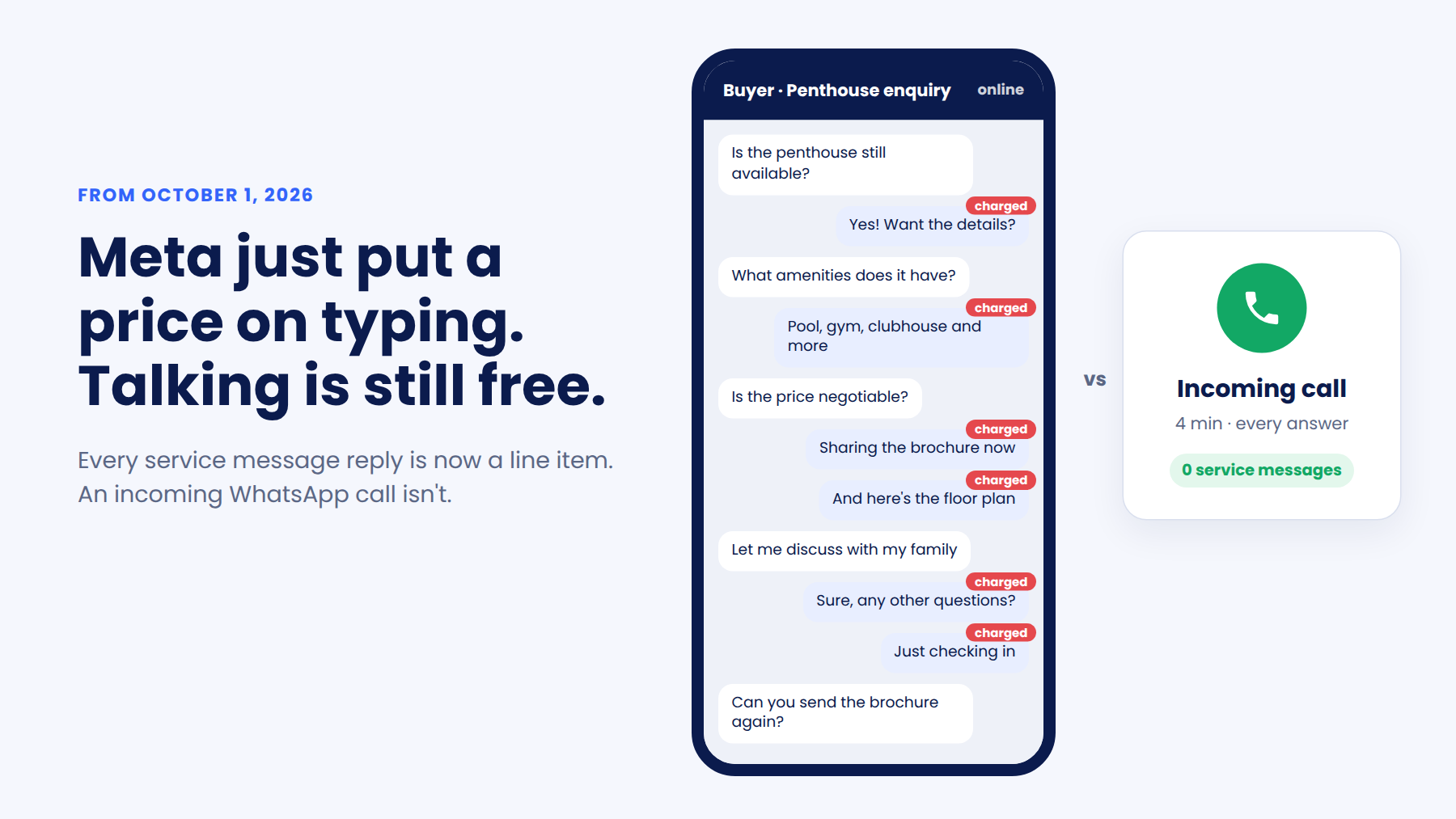
A buyer asks about a penthouse listing. Your rep answers. They ask about amenities. Your rep answers. They ask if the price is negotiable, and your rep sends a brochure, a floor plan, and a hopeful "let me discuss with my family."
Twelve replies. Zero charges.
That changes on October 1, 2026.
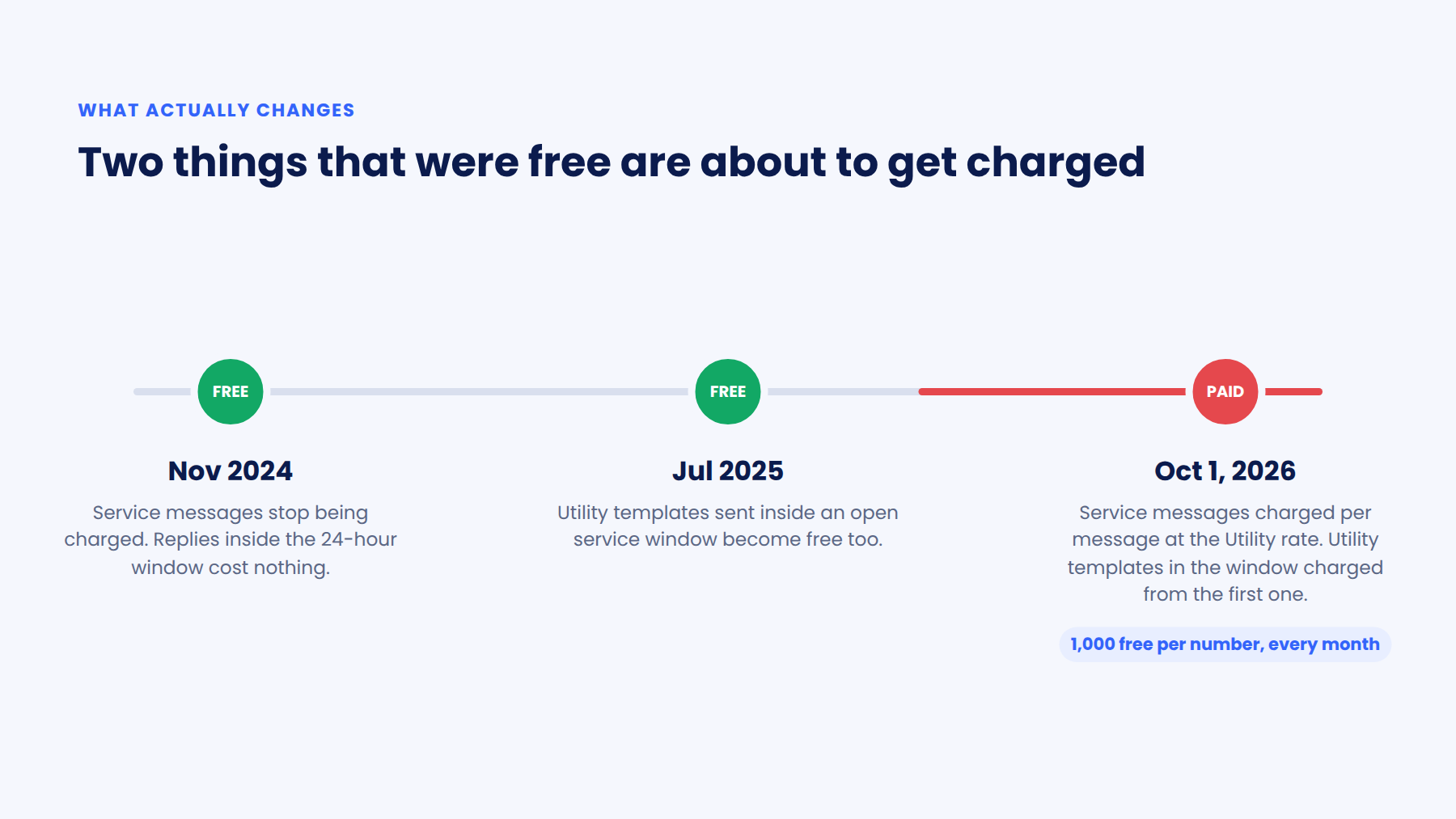
Meta will start charging for service messages, the free-form replies you send inside the 24-hour customer service window. They haven't been charged since November 2024. So if your team has grown used to answering questions one message at a time, it's worth taking a hard look at what that habit is about to cost.
But here’s the good news. There's a way to talk to customers on WhatsApp that doesn't come with a per-message price tag.
You call them. Or better yet, you let them call you.
What actually changes on October 1, 2026
Let's get the facts straight first, because there's a lot that can get lost in translation.
Service messages get a price
Every free-form reply inside the 24-hour window is now charged per message. The rate follows your customer's country and matches the Utility rate for that market. Meta doesn't offer volume tiers on service messages, so sending more won't bring the rate down.
You get 1,000 free ones a month
Each business phone number gets 1,000 free service messages every calendar month. Charges start from the 1,001st. The count resets on the 1st, unused messages don't roll over, and the allowance is per number, not per account.
Utility templates inside the window get charged too
Confirmation messages and booking updates sent inside an open service window were free since July 2025. From October, they're charged from the very first one. The 1,000 allowance doesn't cover them.
And here's what stays the same:
1,000 free messages sounds generous. But it depends on who you are as a business.
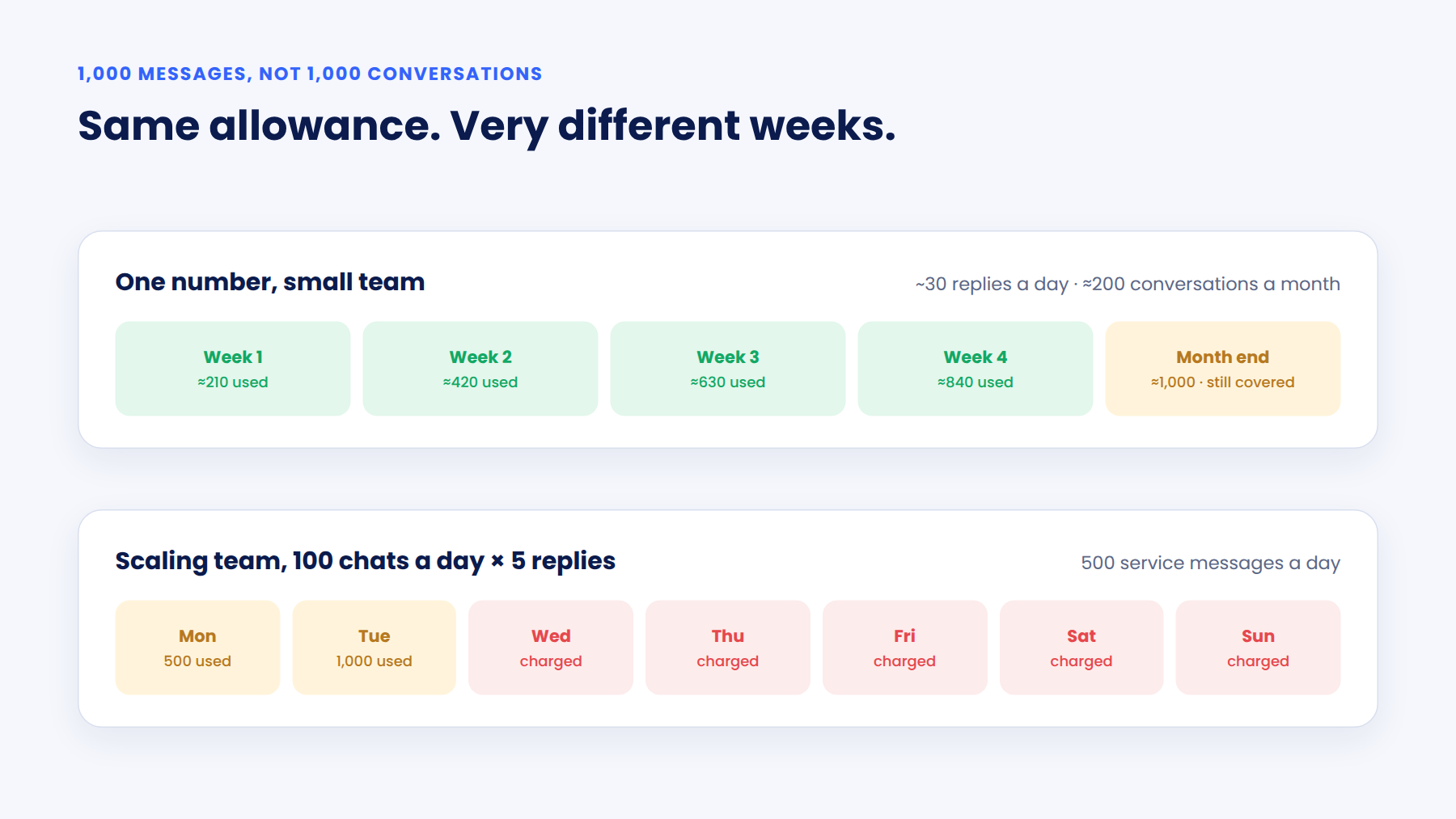
It's 1,000 messages. Not 1,000 conversations.
A typical support chat runs five or six replies. That puts your free allowance closer to 200 conversations a month. Or roughly 30 replies a day from one number.
If you're a standalone clinic, a boutique agency, or a growing D2C brand with one number and a small team, that might cover you comfortably. For you, October 1 is mostly a reason to tidy up. Reply faster, send fewer "just checking" messages, and you may never see a service message charge.
That's a fair deal. Meta clearly designed it with smaller businesses in mind.
Now picture a scaling organization. Several sales and support teams. Leads pouring in from ads across markets. A team handling 100 conversations a day at five replies each sends 500 service messages a day.
The allowance is gone before Wednesday lunch.
And for a real estate developer or an admissions office, a single qualified lead can easily run 15 or 20 replies. Budget. Location. Possession date. Loan options. "Can you send the brochure again?" Every one of those is now a line item, and there are no volume tiers on service messages to soften it as you grow.
You could spread the load across more phone numbers, since the allowance is per number. But customers don't think in numbers. Split your conversations across five of them and you've split your customer's context across five threads.
So here's how I'd put it.
If you're small, the allowance is your safety net.
If you're scaling, your cost of conversation now grows with every reply. You need a way to talk to customers that doesn't.
Some chats are loops that never end
I'll be honest. Meta charging for service messages isn't the real problem.
The real problem is that a lot of customer conversations were never meant to be typed.
Think about the last time you tried to sort out something complicated over chat. You typed a paragraph. They replied with a question. You clarified. They asked for a screenshot. Twenty minutes later, you had the answer a two-minute call would have given you.
Your customers feel exactly the same way.
They don't want a conversation. They want something to happen. A site visit booked. A treatment explained. A course that fits their kid. The conversation is just where that need shows up.
And your reps want to close, not play question tennis across three browser tabs.
Until now, the long thread was a productivity problem. From October 1, it's also a revenue problem with an invoice attached.
Where the meter starts running (yes, even on your ad leads)
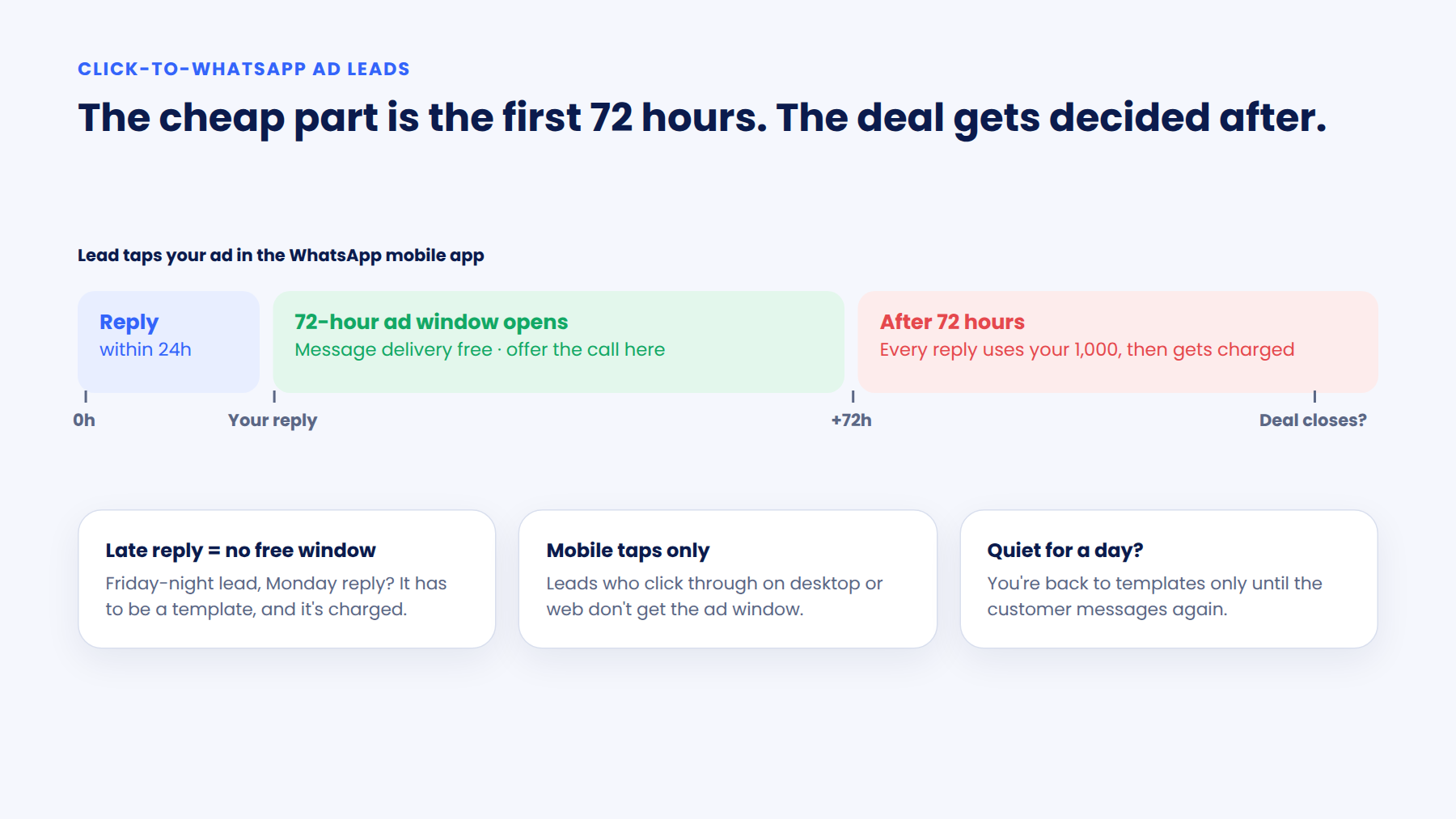
A lot of marketers are breathing easy because their leads come from Click-to-WhatsApp ads, and the 72-hour ad window stays free.
That's true. But the fine print decides whether you actually get those 72 free hours.
The window only opens when you reply
And you have to reply within the normal 24 hours. If a lead comes in on Friday night and your team replies on Monday, there's no free window. Your reply has to be a template, and it's charged.
Only mobile app taps count
The ad window applies when someone taps through on the WhatsApp mobile app. Leads who click through on desktop or web don't qualify.
It runs alongside the 24-hour window, not instead of it
If the lead goes quiet for a day, you're back to templates only. They're free inside the 72 hours, but you can't send free-form replies until the customer messages again.
Seventy-two hours is short for high-touch sales
A property purchase, a medical procedure, or a university admission rarely closes in three days. Once the ad window shuts, every follow-up reply comes out of your 1,000, and then out of your wallet.
So here's the uncomfortable truth.
The cheap part of the ad conversation is the first three days. The expensive part is everything after, which is also where most deals actually get decided.
That makes the first 72 hours the best time to move the conversation somewhere cheaper and faster.
Like a WhatsApp call.
WhatsApp calling is the “reply” that doesn't cost you per message
When you turn on WhatsApp calling in Gallabox, customers see a call button right inside your business chat. They tap it. The call connects on the same number they've been messaging.
No new app. No unknown number flashing on their screen. No "new phone, who dis?"
And incoming WhatsApp Business calls are free.
That's the part worth sitting with. A customer who would have sent you 15 messages can tap one button, talk for four minutes, and walk away with every answer. None of it counts against your service message allowance.
For a scaling team, this is the real shift. Your message bill grows with every reply your reps send. Your inbound call volume can grow without adding a single service message charge. That's how you scale conversations without scaling the invoice.
Every call sits in the same thread as the chat history in your Gallabox shared team inbox. So whoever picks up already knows what was said.
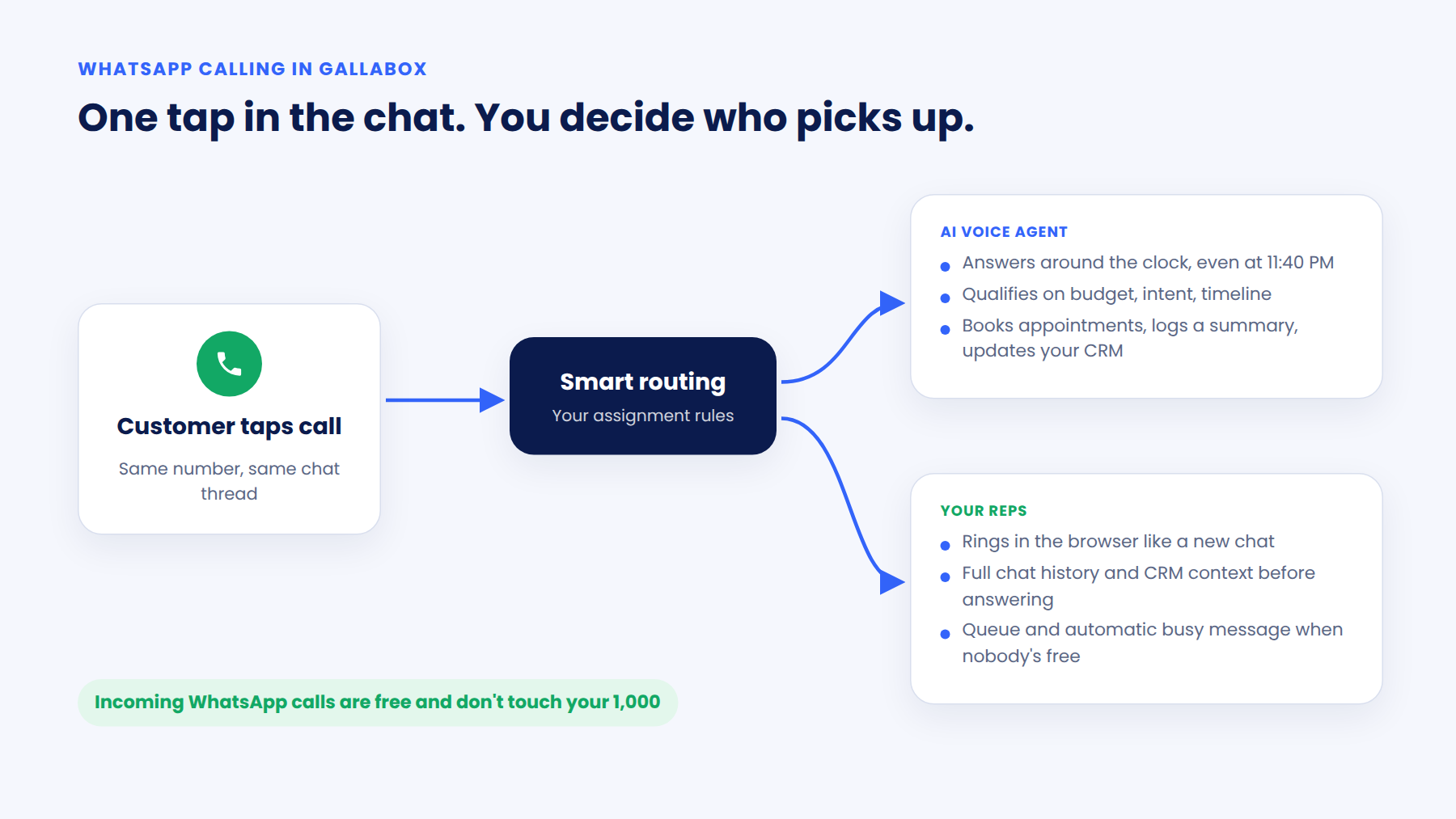
You also get to decide who picks up with smart routing.
Let an AI voice agent answer
The Gallabox AI voice agent picks up incoming WhatsApp calls around the clock. It talks to the caller in natural conversation, qualifies them on the things you care about (budget, intent, timeline, service needs), and books appointments.
When the call ends, it logs a summary in the same thread. It also pulls structured fields out of the call and pushes them to your CRM, so nobody has to sit through a recording to find out what happened.
Your team then picks up a qualified lead with full context. Not from a missed call and some guesswork.
At enterprise volume, this is also how you stop hiring your way out of peak season. The agent picks up the hundredth call the same way it picks up the first.
This is the one for the lead who calls at 11:40 PM, when the most motivated version of your prospect is awake and your team isn't.
Route calls to your reps
Some conversations need a person. A price negotiation. A worried patient. A parent comparing three colleges.
With human calling, incoming WhatsApp calls ring in the browser the same way a new chat does. Your assignment rules decide which team or rep gets the call. Before they answer, the rep can see the complete chat history and CRM context.
If several calls come in at once, they wait in a queue. If nobody's free, Gallabox sends the caller a busy message automatically. Calls are recorded, and only authorized users can access the recordings.
7 places to use WhatsApp calling and save on service messages
Turning WhatsApp calling on is the easy part. Getting customers to actually use it is where the thinking goes.
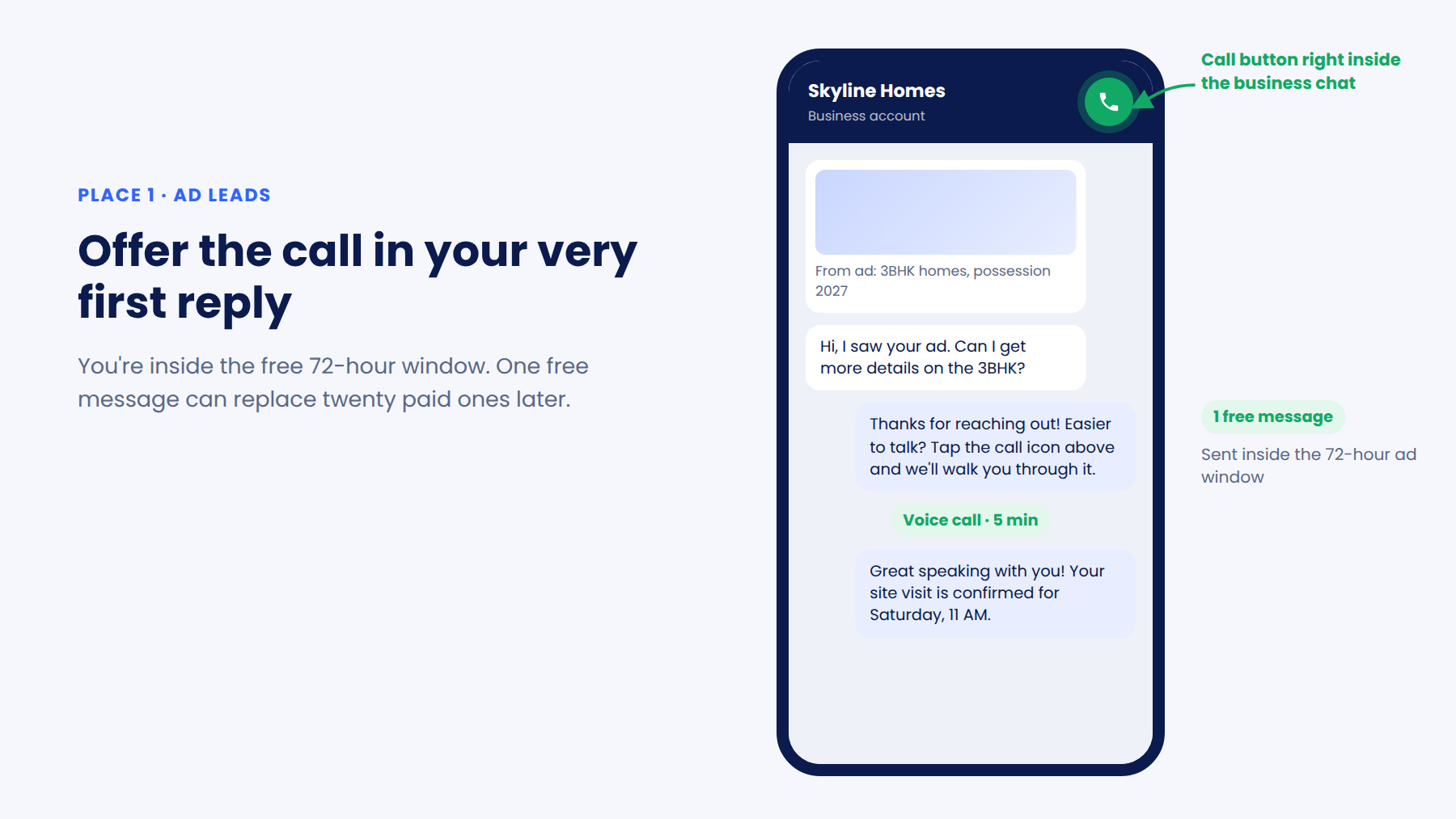
1. Offer the call in your first reply to ad leads
You're inside the free 72-hour window. Use it to say, "Easier to talk? Tap the call icon above and we'll walk you through it." One free message that can replace twenty paid ones later.
2. Suggest a call when the thread starts to sprawl
Look at your own data. If most of your conversions happen within eight messages and the long threads rarely close, have your bot or agent offer a call once a chat crosses that line.
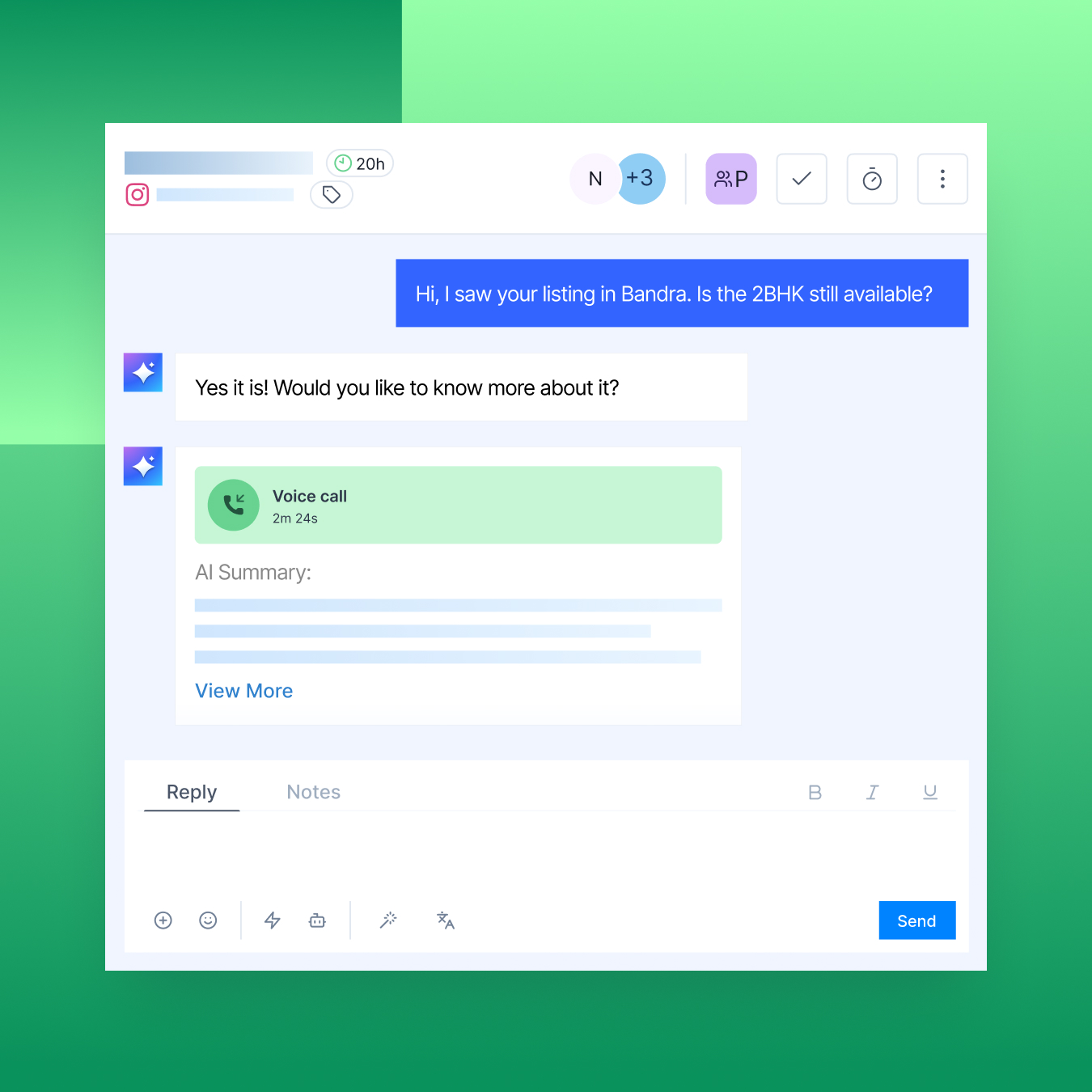
3. Hand the hard topics to AI voice
Pricing and discounts. Loan or insurance eligibility. Treatment options. Course fit. These are the questions that spawn follow-up questions. Move them to a call by default.
4. Let the voice AI agent own after-hours
Instead of a lead typing into a quiet inbox at midnight, they call and get answered, qualified, and booked. Your team walks in to summaries, not a backlog.
5. Stop negotiating calendar slots over chat.
"Does Tuesday work?" "What about 4?" "Can we do 5 instead?" That's four service messages to book one visit. Let the agent book it on a call, then send a single confirmation.
6. Make your busy message earn its keep
When no rep is free, the caller gets one automatic message. Write it so it sets a clear expectation, instead of opening a new back-and-forth.
7. Call warm leads before the trail goes cold.
Your reps can place outgoing WhatsApp calls once the customer has given permission. You can ask for that permission with a free-form message inside the service window or with a template outside it. WhatsApp allows one permission request a day and two a week per customer, and the customer can grant it for seven days or permanently.
Outgoing calls are charged to your message credits, so aim them at leads that have already shown intent. A warm lead who's been quiet for a week is a far better use of that credit than a cold one.
It’s hardly ever about the pricing
If calling was purely a cost play, I'd still recommend it. Because there are bigger business implications involved here with growth and revenue.
Speed to lead
A lead who can call you the moment they're interested doesn't have to wait for a rep to finish typing.
Trust on big purchases
Nobody buys a villa, plans their vacation, books surgery, or commits to a four-year degree over emojis. Hearing a voice matters when the stakes are high.
Customers would rather talk
Plenty of people prefer speaking in their own language to typing out a long question. Many of your highest-value buyers are in that group.
No more cold callbacks
Your rep calls from the same number, in the same thread, with the same context. The customer never has to start from scratch.
Every call becomes data
AI calls get scored, structured, and pushed to your CRM. Human calls are logged with status and duration. You can finally tie a call to a chat to an outcome.
This is where conversations stop being something you manage and start being something that moves a deal forward.
What you need to know before you flip the switch for WhatsApp calling
I'd rather you hear this here before finding out mid-setup after all the time spent in evaluation.
There's a messaging threshold. Meta requires your WhatsApp number to reach a daily limit of 2,000 unique recipients before calling can be activated. Once you cross it, calling becomes available automatically.
Read that again, because it tells you who this is built for. If you're reaching 2,000 unique people a day, you're almost certainly sending far more than 1,000 service messages a month. The businesses the free allowance doesn't cover are the ones WhatsApp calling opens up for.
Plans matter. WhatsApp calling is available on eligible Gallabox plans. The voice AI agent is available on Advanced and Enterprise plans.
Some regions aren't live yet. WhatsApp Business Calling isn't available yet for numbers in Saudi Arabia, the UAE, Kuwait, Qatar, Bahrain, and Oman. Numbers in the USA, Canada, Egypt, Vietnam, and Nigeria can receive calls but can't place business-initiated ones. For markets where WhatsApp calling isn't available, the Gallabox voice AI agent can work on regular phone numbers instead.
Your October checklist
- Measure how many service messages an average conversation takes today, per number.
- Reply to every ad lead inside 24 hours, so the free 72-hour window actually opens.
- Turn on WhatsApp calling and choose who answers: your voice AI agent, your reps, or both across different hours.
- Rewrite your first replies and bot flows so the call button gets mentioned early, and often.
Meta just put a price on typing. Talking is still free.
That homebuyer may still have twelve questions before any commitment. Let them ask all twelve in one call and move forward.
Book a demo to see WhatsApp calling and the voice AI agent in action.
FAQs about WhatsApp service message charges
What is a WhatsApp service message?
It's any free-form reply a business sends inside the 24-hour customer service window, which opens when a customer messages you. Templates are a separate category.
When does Meta start charging for service messages?
From October 1, 2026. Service messages haven't been charged since November 2024.
Is the 1,000 free allowance per number or per account?
Per number. Each business phone number gets its own 1,000 free service messages every calendar month.
Do unused free service messages roll over?
No. The count resets on the 1st of every month, and anything unused that month is gone.
Are failed messages charged?
No. You only pay for service messages that are delivered.
Do utility templates sent inside the service window count toward the 1,000?
No. From October 1, utility templates sent inside an open service window are charged from the very first one. The free allowance only covers free-form service messages.
Can I avoid charges by using more phone numbers?
Technically, yes, since the allowance is per number. But customers don't think in numbers. Splitting conversations across several numbers splits each customer's context across several threads.
Do WhatsApp calls count against my service message allowance?
No. Incoming WhatsApp calls are free and don't use your allowance. Outgoing calls placed by your reps are charged to your message credits.
How do I get permission to call a customer on WhatsApp?
You can ask with a free-form message inside the service window, or with a template outside it. WhatsApp allows one permission request a day and two a week per customer, and the customer can grant it for seven days or permanently.
Who can use WhatsApp calling on Gallabox?
Your number needs to reach a daily messaging limit of 2,000 unique recipients, after which calling becomes available automatically. Calling is on eligible Gallabox plans, and the voice AI agent is on Advanced and Enterprise.
Is WhatsApp calling available in the UAE or Saudi Arabia?
Not yet. WhatsApp Business Calling isn't live for numbers in the UAE, Saudi Arabia, Kuwait, Qatar, Bahrain, and Oman, where the Gallabox voice AI agent can work on regular phone numbers instead. Numbers in the USA, Canada, Egypt, Vietnam, and Nigeria can receive calls but can't place business-initiated ones.
What happens if a customer calls and no rep is free?
Calls wait in a queue. If nobody's available, Gallabox sends the caller an automatic busy message, which you can write yourself.
.svg)

.png)
Get your business on WhatsApp with Gallabox
Heading

For almost two years, replying to a customer on WhatsApp cost you nothing.
A buyer asks about a penthouse listing. Your rep answers. They ask about amenities. Your rep answers. They ask if the price is negotiable, and your rep sends a brochure, a floor plan, and a hopeful "let me discuss with my family."
Twelve replies. Zero charges.
That changes on October 1, 2026.
Meta will start charging for service messages, the free-form replies you send inside the 24-hour customer service window. They haven't been charged since November 2024. So if your team has grown used to answering questions one message at a time, it's worth taking a hard look at what that habit is about to cost.
But here’s the good news. There's a way to talk to customers on WhatsApp that doesn't come with a per-message price tag.
You call them. Or better yet, you let them call you.
What actually changes on October 1, 2026
Let's get the facts straight first, because there's a lot that can get lost in translation.
Service messages get a price
Every free-form reply inside the 24-hour window is now charged per message. The rate follows your customer's country and matches the Utility rate for that market. Meta doesn't offer volume tiers on service messages, so sending more won't bring the rate down.
You get 1,000 free ones a month
Each business phone number gets 1,000 free service messages every calendar month. Charges start from the 1,001st. The count resets on the 1st, unused messages don't roll over, and the allowance is per number, not per account.
Utility templates inside the window get charged too
Confirmation messages and booking updates sent inside an open service window were free since July 2025. From October, they're charged from the very first one. The 1,000 allowance doesn't cover them.
And here's what stays the same:
1,000 free messages sounds generous. But it depends on who you are as a business.
It's 1,000 messages. Not 1,000 conversations.
A typical support chat runs five or six replies. That puts your free allowance closer to 200 conversations a month. Or roughly 30 replies a day from one number.
If you're a standalone clinic, a boutique agency, or a growing D2C brand with one number and a small team, that might cover you comfortably. For you, October 1 is mostly a reason to tidy up. Reply faster, send fewer "just checking" messages, and you may never see a service message charge.
That's a fair deal. Meta clearly designed it with smaller businesses in mind.
Now picture a scaling organization. Several sales and support teams. Leads pouring in from ads across markets. A team handling 100 conversations a day at five replies each sends 500 service messages a day.
The allowance is gone before Wednesday lunch.
And for a real estate developer or an admissions office, a single qualified lead can easily run 15 or 20 replies. Budget. Location. Possession date. Loan options. "Can you send the brochure again?" Every one of those is now a line item, and there are no volume tiers on service messages to soften it as you grow.
You could spread the load across more phone numbers, since the allowance is per number. But customers don't think in numbers. Split your conversations across five of them and you've split your customer's context across five threads.
So here's how I'd put it.
If you're small, the allowance is your safety net.
If you're scaling, your cost of conversation now grows with every reply. You need a way to talk to customers that doesn't.
Some chats are loops that never end
I'll be honest. Meta charging for service messages isn't the real problem.
The real problem is that a lot of customer conversations were never meant to be typed.
Think about the last time you tried to sort out something complicated over chat. You typed a paragraph. They replied with a question. You clarified. They asked for a screenshot. Twenty minutes later, you had the answer a two-minute call would have given you.
Your customers feel exactly the same way.
They don't want a conversation. They want something to happen. A site visit booked. A treatment explained. A course that fits their kid. The conversation is just where that need shows up.
And your reps want to close, not play question tennis across three browser tabs.
Until now, the long thread was a productivity problem. From October 1, it's also a revenue problem with an invoice attached.
Where the meter starts running (yes, even on your ad leads)
A lot of marketers are breathing easy because their leads come from Click-to-WhatsApp ads, and the 72-hour ad window stays free.
That's true. But the fine print decides whether you actually get those 72 free hours.
The window only opens when you reply
And you have to reply within the normal 24 hours. If a lead comes in on Friday night and your team replies on Monday, there's no free window. Your reply has to be a template, and it's charged.
Only mobile app taps count
The ad window applies when someone taps through on the WhatsApp mobile app. Leads who click through on desktop or web don't qualify.
It runs alongside the 24-hour window, not instead of it
If the lead goes quiet for a day, you're back to templates only. They're free inside the 72 hours, but you can't send free-form replies until the customer messages again.
Seventy-two hours is short for high-touch sales
A property purchase, a medical procedure, or a university admission rarely closes in three days. Once the ad window shuts, every follow-up reply comes out of your 1,000, and then out of your wallet.
So here's the uncomfortable truth.
The cheap part of the ad conversation is the first three days. The expensive part is everything after, which is also where most deals actually get decided.
That makes the first 72 hours the best time to move the conversation somewhere cheaper and faster.
Like a WhatsApp call.
WhatsApp calling is the “reply” that doesn't cost you per message
When you turn on WhatsApp calling in Gallabox, customers see a call button right inside your business chat. They tap it. The call connects on the same number they've been messaging.
No new app. No unknown number flashing on their screen. No "new phone, who dis?"
And incoming WhatsApp Business calls are free.
That's the part worth sitting with. A customer who would have sent you 15 messages can tap one button, talk for four minutes, and walk away with every answer. None of it counts against your service message allowance.
For a scaling team, this is the real shift. Your message bill grows with every reply your reps send. Your inbound call volume can grow without adding a single service message charge. That's how you scale conversations without scaling the invoice.
Every call sits in the same thread as the chat history in your Gallabox shared team inbox. So whoever picks up already knows what was said.
You also get to decide who picks up with smart routing.
Let an AI voice agent answer
The Gallabox AI voice agent picks up incoming WhatsApp calls around the clock. It talks to the caller in natural conversation, qualifies them on the things you care about (budget, intent, timeline, service needs), and books appointments.
When the call ends, it logs a summary in the same thread. It also pulls structured fields out of the call and pushes them to your CRM, so nobody has to sit through a recording to find out what happened.
Your team then picks up a qualified lead with full context. Not from a missed call and some guesswork.
At enterprise volume, this is also how you stop hiring your way out of peak season. The agent picks up the hundredth call the same way it picks up the first.
This is the one for the lead who calls at 11:40 PM, when the most motivated version of your prospect is awake and your team isn't.
Route calls to your reps
Some conversations need a person. A price negotiation. A worried patient. A parent comparing three colleges.
With human calling, incoming WhatsApp calls ring in the browser the same way a new chat does. Your assignment rules decide which team or rep gets the call. Before they answer, the rep can see the complete chat history and CRM context.
If several calls come in at once, they wait in a queue. If nobody's free, Gallabox sends the caller a busy message automatically. Calls are recorded, and only authorized users can access the recordings.
7 places to use WhatsApp calling and save on service messages
Turning WhatsApp calling on is the easy part. Getting customers to actually use it is where the thinking goes.
1. Offer the call in your first reply to ad leads
You're inside the free 72-hour window. Use it to say, "Easier to talk? Tap the call icon above and we'll walk you through it." One free message that can replace twenty paid ones later.
2. Suggest a call when the thread starts to sprawl
Look at your own data. If most of your conversions happen within eight messages and the long threads rarely close, have your bot or agent offer a call once a chat crosses that line.
3. Hand the hard topics to AI voice
Pricing and discounts. Loan or insurance eligibility. Treatment options. Course fit. These are the questions that spawn follow-up questions. Move them to a call by default.
4. Let the voice AI agent own after-hours
Instead of a lead typing into a quiet inbox at midnight, they call and get answered, qualified, and booked. Your team walks in to summaries, not a backlog.
5. Stop negotiating calendar slots over chat.
"Does Tuesday work?" "What about 4?" "Can we do 5 instead?" That's four service messages to book one visit. Let the agent book it on a call, then send a single confirmation.
6. Make your busy message earn its keep
When no rep is free, the caller gets one automatic message. Write it so it sets a clear expectation, instead of opening a new back-and-forth.
7. Call warm leads before the trail goes cold.
Your reps can place outgoing WhatsApp calls once the customer has given permission. You can ask for that permission with a free-form message inside the service window or with a template outside it. WhatsApp allows one permission request a day and two a week per customer, and the customer can grant it for seven days or permanently.
Outgoing calls are charged to your message credits, so aim them at leads that have already shown intent. A warm lead who's been quiet for a week is a far better use of that credit than a cold one.
It’s hardly ever about the pricing
If calling was purely a cost play, I'd still recommend it. Because there are bigger business implications involved here with growth and revenue.
Speed to lead
A lead who can call you the moment they're interested doesn't have to wait for a rep to finish typing.
Trust on big purchases
Nobody buys a villa, plans their vacation, books surgery, or commits to a four-year degree over emojis. Hearing a voice matters when the stakes are high.
Customers would rather talk
Plenty of people prefer speaking in their own language to typing out a long question. Many of your highest-value buyers are in that group.
No more cold callbacks
Your rep calls from the same number, in the same thread, with the same context. The customer never has to start from scratch.
Every call becomes data
AI calls get scored, structured, and pushed to your CRM. Human calls are logged with status and duration. You can finally tie a call to a chat to an outcome.
This is where conversations stop being something you manage and start being something that moves a deal forward.
What you need to know before you flip the switch for WhatsApp calling
I'd rather you hear this here before finding out mid-setup after all the time spent in evaluation.
There's a messaging threshold. Meta requires your WhatsApp number to reach a daily limit of 2,000 unique recipients before calling can be activated. Once you cross it, calling becomes available automatically.
Read that again, because it tells you who this is built for. If you're reaching 2,000 unique people a day, you're almost certainly sending far more than 1,000 service messages a month. The businesses the free allowance doesn't cover are the ones WhatsApp calling opens up for.
Plans matter. WhatsApp calling is available on eligible Gallabox plans. The voice AI agent is available on Advanced and Enterprise plans.
Some regions aren't live yet. WhatsApp Business Calling isn't available yet for numbers in Saudi Arabia, the UAE, Kuwait, Qatar, Bahrain, and Oman. Numbers in the USA, Canada, Egypt, Vietnam, and Nigeria can receive calls but can't place business-initiated ones. For markets where WhatsApp calling isn't available, the Gallabox voice AI agent can work on regular phone numbers instead.
Your October checklist
- Measure how many service messages an average conversation takes today, per number.
- Reply to every ad lead inside 24 hours, so the free 72-hour window actually opens.
- Turn on WhatsApp calling and choose who answers: your voice AI agent, your reps, or both across different hours.
- Rewrite your first replies and bot flows so the call button gets mentioned early, and often.
Meta just put a price on typing. Talking is still free.
That homebuyer may still have twelve questions before any commitment. Let them ask all twelve in one call and move forward.
Book a demo to see WhatsApp calling and the voice AI agent in action.
FAQs about WhatsApp service message charges
What is a WhatsApp service message?
It's any free-form reply a business sends inside the 24-hour customer service window, which opens when a customer messages you. Templates are a separate category.
When does Meta start charging for service messages?
From October 1, 2026. Service messages haven't been charged since November 2024.
Is the 1,000 free allowance per number or per account?
Per number. Each business phone number gets its own 1,000 free service messages every calendar month.
Do unused free service messages roll over?
No. The count resets on the 1st of every month, and anything unused that month is gone.
Are failed messages charged?
No. You only pay for service messages that are delivered.
Do utility templates sent inside the service window count toward the 1,000?
No. From October 1, utility templates sent inside an open service window are charged from the very first one. The free allowance only covers free-form service messages.
Can I avoid charges by using more phone numbers?
Technically, yes, since the allowance is per number. But customers don't think in numbers. Splitting conversations across several numbers splits each customer's context across several threads.
Do WhatsApp calls count against my service message allowance?
No. Incoming WhatsApp calls are free and don't use your allowance. Outgoing calls placed by your reps are charged to your message credits.
How do I get permission to call a customer on WhatsApp?
You can ask with a free-form message inside the service window, or with a template outside it. WhatsApp allows one permission request a day and two a week per customer, and the customer can grant it for seven days or permanently.
Who can use WhatsApp calling on Gallabox?
Your number needs to reach a daily messaging limit of 2,000 unique recipients, after which calling becomes available automatically. Calling is on eligible Gallabox plans, and the voice AI agent is on Advanced and Enterprise.
Is WhatsApp calling available in the UAE or Saudi Arabia?
Not yet. WhatsApp Business Calling isn't live for numbers in the UAE, Saudi Arabia, Kuwait, Qatar, Bahrain, and Oman, where the Gallabox voice AI agent can work on regular phone numbers instead. Numbers in the USA, Canada, Egypt, Vietnam, and Nigeria can receive calls but can't place business-initiated ones.
What happens if a customer calls and no rep is free?
Calls wait in a queue. If nobody's available, Gallabox sends the caller an automatic busy message, which you can write yourself.
Get your business on WhatsApp with Gallabox
Get your business on WhatsApp with Gallabox
Related articles

Take Gallabox for a 7-day ride
.svg)


%201.webp)


